Ideogram launches object remover tool for photos
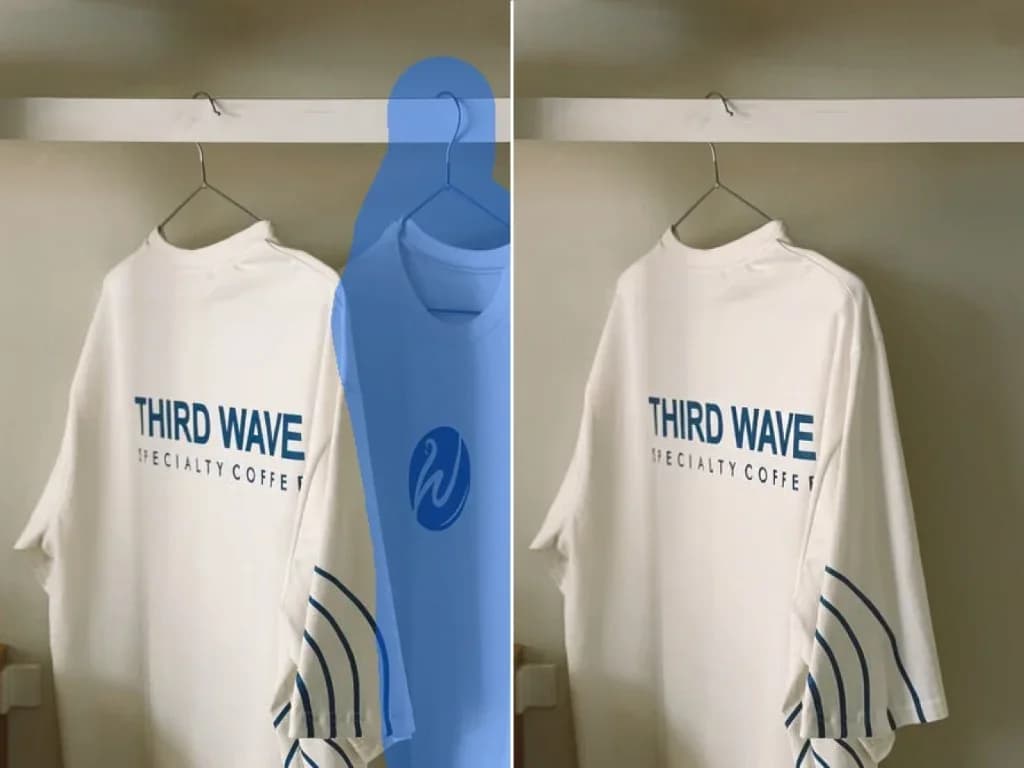
Ideogram has released a new object remover feature accessible via its web apps. The tool allows users to brush over distractions in photos and erase them while background areas fill in naturally.
Published by Jin · 2 min read · 5 AUG 2026
- ideogram.ai/apps/object-remover
- POST /v1/remove-object
- Photographers and e-commerce teams
Ideogram has expanded its suite of editing features with the official launch of the Ideogram Object Remover. Accessible directly through the company web applications, the new tool is designed for photographers, e-commerce teams, and designers who need to eliminate unwanted elements from photographs without resorting to complex cloning or retouching workflows.
Streamlined Photo Editing with AI
The Object Remover tool functions through a straightforward three-step process. Users upload an image, brush a mask over the object, person, or distraction they want removed, and run the generator. The underlying model then erases the selected element and rebuilds the background behind it.
According to official details, the system is engineered to handle common visual clutter such as photobombers, street signs, power lines, and packaging labels. Rather than leaving flat patches or smudges common in generic erasers, the model reads surrounding pixels to ensure that shadows, grain, perspective, and lighting remain consistent with the original frame.
Specialized Cleanup Capabilities
Beyond general objects, the tool can also clear text, logos, and watermarks from images. This capability makes it useful for cleaning up screenshots, scanned prints, and brand mockups where overlays or date stamps interfere with an otherwise usable composition.
For e-commerce sellers and brand designers, the removal of distracting props and background mess helps produce polished listing images and marketing assets quickly, eliminating the need to send every asset through an extensive retouching queue or reshoot product photos.
Availability and Integration
For developers and platforms looking to incorporate automated photo editing, Ideogram also provides programmatic access through its API. The remove-object endpoint accepts an image and a mask via a standard POST request, returning a cleaned image with the specified area filled in.
The launch of the object remover follows a series of updates from Ideogram, adding to their ecosystem of web-based applications designed to support visual design and content creation workflows.
Source — Ideogram ↗
Worth a read?
Comments · 0